Everything you need to know about using a GoPro underwater, from waterproof ratings to camera settings and where it falls short
GoPro cameras have become one of the most common choices for filming underwater, from snorkelling and diving to fishing and boat inspections. But using a GoPro underwater well takes more than just pressing record.
This guide covers what you need to know: native waterproofing, when you need a housing, the best settings for underwater footage, and where a GoPro’s limitations show up in real use.

Native Waterproofing: What It Actually Covers
Recent GoPro models, including the HERO9 through HERO13 Black, are waterproof without a housing down to 10m (33ft). This covers most snorkelling and shallow swimming use without needing to buy anything extra.
Beyond that depth, or for extra protection against sand, saltwater corrosion and impact, GoPro’s official protective housing extends this to 60m (196ft), depending on the model.
Practical takeaway: if you’re snorkelling in shallow water, your GoPro likely doesn’t need a housing at all. If you’re diving deeper, or want peace of mind in rougher conditions, a housing is worth it.
Getting Set Up Before You Dive In
A few setup steps make a noticeable difference to underwater footage:
- Check the door seal. If using a housing, make sure it’s fully closed and the O-ring is clean before entering the water.
- Use a fresh or well-charged battery. Cold water can reduce battery performance faster than expected.
- Attach a floating handle or wrist strap. Cameras that slip from your grip underwater can be very difficult to recover.
- Format your SD card before each session to avoid running out of space mid-dive.
Best GoPro Settings for Underwater Footage

Underwater lighting and colour behave differently to filming on land. Which settings make sense depends on whether you plan to edit your footage afterwards or want it ready to share straight off the camera.
If you don’t want to edit: shoot for straight-out-of-camera results
- Leave white balance on Auto. Recent GoPro models handle underwater colour well enough on Auto that manual adjustment usually isn’t necessary if you’re not editing. Auto white balance has genuinely improved with each generation, and if you’d rather not touch settings at all, straight-out-of-camera footage on recent models is already impressive without any manual adjustment.
- Keep Protune off. Protune is built for footage you plan to colour grade, without editing, the standard colour profile looks better straight away.
- For social media, shoot 2.7K at 50fps (Australia/UK/Europe) or 60fps (US and other 60Hz regions). 2.7K sits between 1080p and 4K, sharp enough to look great on Instagram, TikTok and YouTube Shorts, without the large file sizes and slower uploads of full 4K. Frame rate depends on your region’s power grid standard: 50Hz countries (Australia, UK, Europe) traditionally use 50fps, 60Hz countries (US) use 60fps, matching how video has historically been standardised to avoid lighting flicker.
- Shoot in landscape and crop later if you’re posting to Reels, TikTok or Stories, gives you more flexibility in editing than committing to vertical at the time of filming. Worth noting: wider field of view settings can introduce slight softness or blur toward the edges of the frame, a trade-off of the wider lens rather than a fault with the camera, so it’s worth testing narrower FOV if edge sharpness matters for your shot.
- Turn HDR on (where available) for punchier, more shareable footage without any extra work.
- Keep HyperSmooth stabilisation on to smooth out the natural movement of being in the water.
If you plan to edit: shoot flatter footage with more room to grade
- Turn Protune on and select a flat colour profile (GP-Log, if your model supports it). This preserves more dynamic range and colour detail for grading later, at the cost of footage looking washed out and green/blue straight off the camera, expected, and corrected in editing.
- Set white balance manually once you’re a few metres down, rather than leaving it on Auto, gives you a consistent starting point to colour grade from.
- Use a red dive filter if shooting in natural light without external lighting, this reduces some of the colour correction needed in editing.
- Choose a higher frame rate (60fps or above) if you want the option to slow footage down without losing smoothness.
- Keep in-camera sharpening and saturation settings low or neutral, these are easier to add in editing than to remove.
Practical takeaway: if you don’t plan to edit, Auto white balance with Protune off gets you strong, shareable results straight away. If you do plan to edit, shoot flat with Protune and manual white balance, footage will look underwhelming on the camera itself, but gives you far more to work with afterwards.
GoPro vs DJI Action Cameras Underwater: What We’ve Noticed
Both GoPro and DJI produce genuinely impressive footage underwater, and most people would be happy with either. That said, comparing footage side by side, we’ve noticed a few real differences worth knowing.
GoPro’s underwater colour tends to sit slightly cooler/greener than DJI’s Action 5 Pro and Action 6, likely down to sensor and colour processing differences rather than anything underwater-specific. DJI leans toward punchier, more processed colour out of the camera, which some people prefer and others find a little strong, it comes down to taste and how much you enjoy colour grading in editing.
Battery life is the more practical difference: in our experience, the DJI Action 6 holds up better over longer sessions than recent GoPro models. Worth factoring in if you’re planning extended time in the water without an easy way to swap batteries.
One thing GoPro has handled well: no heating issues in our use, helped along by keeping the camera out of direct sun between dives.
Practical takeaway: both are strong choices for underwater use. If longer battery life for extended sessions matters most to you, that’s where DJI currently has the edge. For a deeper side-by-side, see our GoPro Hero11 Black vs DJI Action 3 comparison.
How Much Has It Improved Over Time?

Having tested every recent GoPro model underwater, the short answer is yes, each generation has genuinely improved for underwater use rather than just adding unrelated features.
Of the numbered HERO line, the HERO13 Black is the best yet underwater, building on real improvements from previous generations rather than marginal changes.
One example worth calling out: HERO12, released in September 2023, still shipped with Bluetooth 4.2, a spec the Bluetooth SIG released back in December 2014. By comparison, DJI’s Osmo Action 3, released a year earlier in 2022, already used Bluetooth 5.0. It’s a fair question why GoPro’s flagship camera was still running on a nearly decade-old Bluetooth spec that late. HERO13 finally closes this gap, jumping to WiFi 6 (up from WiFi 5 on HERO12) and Bluetooth 5.3, a meaningful generational upgrade rather than a minor refresh.
Why WiFi and Bluetooth versions actually matter here
Faster WiFi and Bluetooth aren’t just spec-sheet bragging rights, they directly affect how reliably your GoPro connects to your phone or tablet through the Quik app, and how far that connection reaches. Newer standards generally mean a more stable connection at range, and faster file transfer once you’re back on the surface.
But it’s worth being clear about a limitation no WiFi or Bluetooth upgrade can fix: these are radio signals, and radio signals don’t travel well through water. Once a GoPro is a short distance underwater, its WiFi and Bluetooth connection to your phone effectively drops out, regardless of which version the camera supports. This is true even for the newest, fastest wireless chipsets, water is the limiting factor, not the hardware.
This is exactly why a live connection to a submerged GoPro requires a different approach entirely, one that doesn’t rely on WiFi or Bluetooth reaching through water at all.
The GoPro Mission 1 goes a step further and is currently the strongest underwater performer in GoPro’s lineup, ahead of even the HERO13. For more on using Mission 1 underwater, see our guide on live underwater viewing with GoPro Mission 1.
Practical takeaway: if you’re deciding between models specifically for underwater use, GoPro Mission 1 is currently the strongest option we’ve tested, with HERO13 close behind for those who prefer the standard HERO form factor.
| Feature | HERO13 Black | GoPro Mission 1 |
|---|---|---|
| WiFi | WiFi 6 | WiFi 6 |
| Bluetooth | BLE 5.3 | BLE 5.3 |
| Native waterproofing | 10m (33ft) | 10m (33ft) |
| Best for | Standard HERO form factor | Strongest underwater performer tested |
Where the Limitations Actually Show Up
GoPro cameras are genuinely capable underwater, but a few real limitations are worth knowing before you rely on one for a specific task.
If you’re in the water with the camera, seeing what you’re filming is still difficult. Housings limit or block access to the screen entirely, and even on models with a front-facing display, reflections and reduced brightness underwater make it hard to see clearly. In practice, you’re often filming by feel rather than by sight, even when you’re right next to the camera.
If the camera isn’t with you, mounted on a pole, towed behind a boat, dropped to depth, or filming somewhere you’re not physically present, there’s no way to see the footage at all until you retrieve it. As covered above, WiFi and Bluetooth don’t reach through water, so there’s no live feed to a phone or tablet once the camera is submerged and you’re not right next to it.
Battery life drops in cold water, reducing recording time compared to normal use on land.
For many uses, especially fishing, inspections or research where the camera is often positioned away from you rather than in your hand, not being able to see footage in real time is the most practical limitation, more so than image quality or battery life.
Seeing Your GoPro’s Footage Live, Underwater

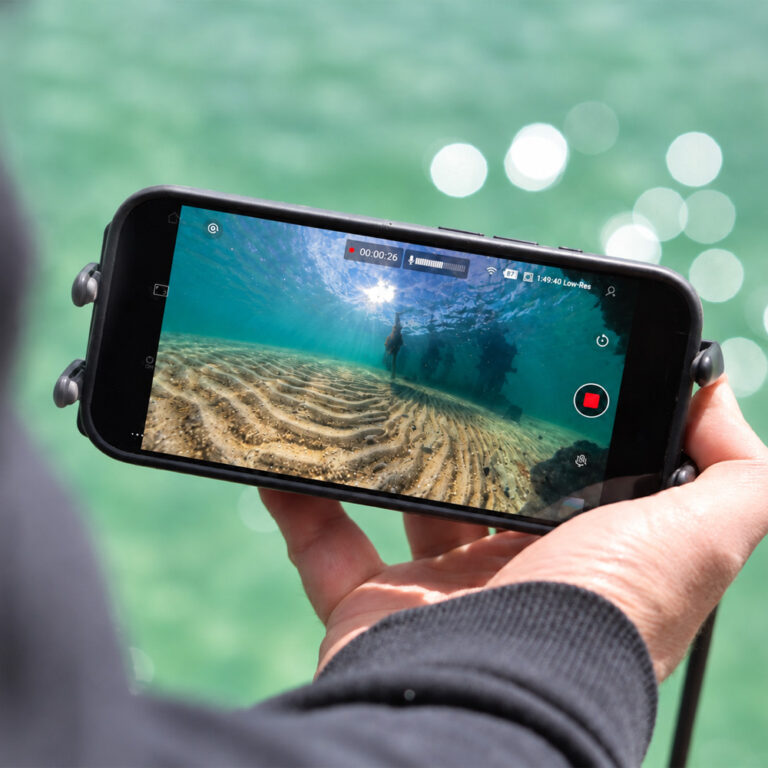
This is the specific gap systems like Seavu are built for. Rather than replacing your GoPro, Seavu adds a live connection between your camera and your phone or tablet while the camera is still underwater.
A receiver sits near the camera, capturing its signal and sending it up through a cable to the surface, where it’s transmitted to your device using the GoPro Quik app. This means you can actually see your GoPro’s live preview while it’s underwater, useful for checking framing, confirming you’re capturing what you think you are, or simply following along in real time rather than reviewing footage afterwards.
If you’re using a GoPro for fishing, inspections or research, being able to see the live feed can be more useful than the recording itself. For more on how live preview performs with GoPro’s newest camera, see GoPro Mission 1 Live Preview: Quik App Control and Real World Performance.
Final Thoughts
A GoPro is a genuinely capable underwater camera for most recreational use, and with the right settings, produces strong results. Its real limitation isn’t image quality, it’s the lack of a live connection once the camera goes underwater.
If seeing your footage live matters for what you’re doing, that’s where a system like Seavu fits in alongside your GoPro, not instead of it.
For a full breakdown of which cameras work best underwater, see our camera compatibility guide.