A practical guide to streaming live underwater footage in real time
Action cameras make it easy to capture underwater footage. However, streaming live underwater footage while the camera is submerged presents a different challenge. Once underwater, standard wireless connections behave very differently.
Whether you are fishing, observing marine life, conducting research, or filming underwater environments, live streaming underwater footage allows you to see what the camera sees in real time. This guide focuses on the practical steps required to stream live underwater footage from an action camera using a tethered live-view system.
For a detailed explanation of how live underwater video works and the different system types available, see our guide on live underwater video feeds.
Why streaming live underwater footage is difficult
Action cameras rely on Wi-Fi and Bluetooth to transmit live video. These wireless signals work well above water but fail almost immediately when the camera is submerged.
Water absorbs high-frequency radio signals, particularly in saltwater. As a result, the wireless connection drops within seconds once the camera goes underwater. This limitation prevents direct live streaming from an action camera to a phone or tablet without additional hardware.
We explain this limitation in more detail in our guide on why Wi-Fi and Bluetooth don’t work underwater.
How tethered live-view systems enable underwater streaming
A tethered live-view system solves this problem by maintaining the camera’s wireless connection to the surface using a physical cable.
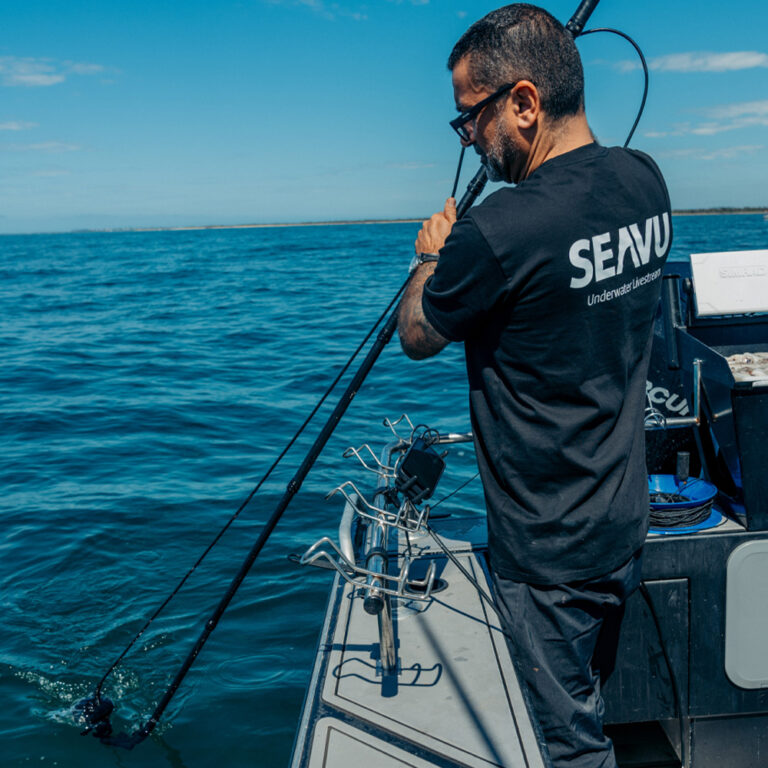
Seavu’s Seeker and Explorer kits use this approach to enable live underwater streaming on mobile devices.
How the system works
- The action camera is placed inside a sealed underwater housing.
- A receiver integrated at the camera end captures the camera’s Wi-Fi and Bluetooth signals.
- A marine-grade tether cable carries the signal to the surface.
- At the surface, a transmitter sends the live feed to a phone or tablet.
- Live footage is viewed using the camera’s native app, such as GoPro Quik or DJI Mimo.
The cable does not transmit Wi-Fi through water. Instead, it carries the wireless signal to the surface, where normal communication with your mobile device can resume.
Step-by-step: streaming live underwater footage
- Mount the camera
Secure your action camera inside its waterproof housing and attach it to the Seavu mount or rig. - Connect the tethered system
Ensure the receiver, tether cable, and surface transmitter are connected correctly. - Configure camera settings
Set up your camera as you normally would for underwater filming. Use the camera’s native app for control and preview. - Deploy the camera underwater
Lower the camera to the desired depth while keeping the surface transmitter above water. - View the live feed
Open the camera’s app on your phone or tablet to view the live underwater video feed in real time.
This setup allows you to monitor framing, subject movement, and camera position without retrieving the camera.
Benefits of streaming live underwater footage
- Real-time visibility – Live viewing allows immediate adjustments to camera position and angle, which improves results and reduces guesswork.
- Improved safety – Professionals can monitor underwater activity from the surface, reducing the need for repeated dives in low-visibility or hazardous conditions.
- Better capture quality – Seeing the live feed helps avoid unusable footage caused by poor framing or lighting.
- Reliable connection – Tethered systems avoid the signal dropouts common with wireless-only approaches.
Common use cases
- Fishing – Live underwater footage helps identify fish behaviour, lure interaction, and seabed conditions in real time.
- Marine research – Researchers can observe habitats and species without continuous diving, improving efficiency and repeatability.
- Filmmaking – Live monitoring allows filmmakers to refine shots while filming underwater environments.
- Exploration – Recreational users can explore underwater areas while maintaining surface visibility and control.
Final thoughts
Streaming live underwater footage from an action camera requires more than a standard wireless connection. Tethered live-view systems make it possible by extending the camera’s Wi-Fi and Bluetooth signals to the surface.
Seavu’s Seeker and Explorer systems provide a practical solution for real-time underwater viewing using a phone or tablet. For users who require higher video quality or professional workflows, wired video systems are also available.
To learn more about the different live underwater video options and how they work, see our complete guide to live underwater video feeds.